
No products in the cart.
Return To Shop
How to Verify Original MuscleTech & Dymatize Products Without an App (Scan Code Guide)
If you’ve searched “muscletech verify without app,” you’re probably standing in front of a tub of Nitro-Tech or a jar of Dymatize ISO100 right now, wondering whether you really need to download a 45MB app just to find out if your protein is real. While checking authenticity is important, many buyers are also comparing the Nitro Tech Protein Price in Pakistan and Dymatize ISO 100 Price in Pakistan before making a purchase. Short answer: for MuscleTech, partly yes; for Dymatize, no. Here’s exactly what each brand’s scan code system actually does, and what you can check without installing anything.
Why people want a no-app option
Three reasons keep showing up:
- You’re standing in a shop and don’t want to download an unfamiliar app on the spot
- Your phone is low on storage, or you’re on a data connection you’d rather not burn
- You just want a quick sanity check before you commit to a purchase, not a full account sign-up
All fair. Here’s where a scan code gets you there without an app, and where the brand still requires one.
MuscleTech: what the scan code does without an app and what it doesn’t
MuscleTech’s official authenticity system (built with SURYS optical-chip technology) puts a QR code and a 10-digit alphanumeric serial number on a holographic sticker, usually just below the logo. This sits alongside the physical red flags covered in our MuscleTech original vs counterfeit identification guide the code is one layer, packaging is another.
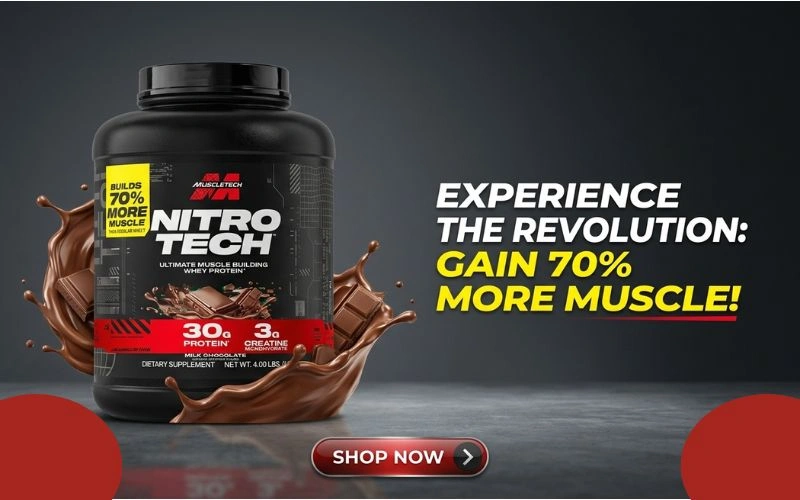
What you can do with just your phone’s built-in camera: Point your regular camera app at the QR code. On a genuine product, this typically opens a link to MuscleTech’s official site or product page. If the code is broken, blurry, doesn’t scan at all, or redirects to a random unrelated page, that’s already a red flag no app required to spot it.
What actually needs the MuscleTech Verify app: The full authentication step where the serial number is checked against MuscleTech’s database and matched against the product description and expiry date happens inside the official MuscleTech Verify app (Android and iOS). Even the manual fallback, where you type in the 10-digit code by hand because the scanner won’t read it, happens inside the app; MuscleTech doesn’t currently offer this as a standalone web form. So if someone tells you there’s a MuscleTech website where you can just type in a code with no download at all, treat that with caution as of now, that option doesn’t exist officially.
If you genuinely don’t want to install it, here’s your no-app fallback:
- Check the hologram itself it should shift color and pattern when tilted under light, not sit flat and printed.
- Compare the batch number and expiry printing against a tub you’ve bought before from a trusted seller.
- Send the batch/serial number to your distributor’s customer service (WhatsApp, email, or call) and ask them to confirm it against their import records. SportsOne, as an authorized, halal-certified distributor in Pakistan, can verify batch codes directly this way without you needing the app.
- Buy only from listed authorized sellers check our stores in Karachi, Lahore, Islamabad, and Gujranwala, or the full list on our stores page since counterfeiters can’t fake a legitimate import trail even if they fake a hologram.
How to check Dymatize authenticity the actual no-app method
Dymatize is the more straightforward “verify without app” case, because the brand runs a web-based authenticator rather than a dedicated app. This complements the packaging-level checks in our Dymatize original verification guide.
- Locate the barcode/scratch panel printed on the jar.
- Scratch it gently to reveal the hidden unique code underneath (commonly a 13-digit code).
- Go to Dymatize’s official product authenticator page and enter your mobile number to receive an OTP.
- Verify the OTP, then submit the scratch code.
- You’ll get an instant response confirming whether the product is genuine.
No app download at any point it’s entirely browser-based. One caveat for Pakistani buyers: Dymatize’s regional authenticator portals are set up market-by-market (India’s is the most established), so a code from Pakistani-imported stock whether it’s a jar ofISO100 or theDymatize Super Mass Gainer may not always resolve on a portal built for another region.

When that happens, don’t treat it as automatic proof of a fake contact your distributor’s customer service with the code and batch number instead. SportsOne, as anauthorized Dymatize seller in Pakistan, can cross-check the batch against import documentation directly.
Muscle Tech Verify: quick reference
| Check | Need an app? | Where |
| Scan QR with regular camera to see if it resolves to an official link | No | Your phone’s camera app |
| Full serial-number authentication against MuscleTech’s database | Yes | MuscleTech Verify app (Android/iOS) |
| Manual code entry if the scanner fails | Yes | Inside the MuscleTech Verify app |
| Hologram, packaging, batch printing checks | No | Visual inspection |
| Distributor batch verification | No | SportsOne customer service |
FAQ
Is there a MuscleTech verification website that doesn’t need the app?
Not officially, as of now. MuscleTech’s serial-number check runs through their Verify app on Android and iOS. A basic camera scan of the QR code can still tell you whether it resolves correctly, which catches the most obvious fakes without installing anything.
How do I check Dymatize authenticity without an app?
Scratch the barcode panel on the jar to reveal the hidden code, then enter it on Dymatize’s official web-based product authenticator along with an OTP sent to your phone no app needed.
What if the scan code doesn’t work at all?
Don’t assume it’s automatically fake regional portal mismatches happen with imported stock. Contact the seller’s customer service with your batch number before drawing conclusions, and stick to authorized distributors so that option is actually available to you.
Where can I buy verified original MuscleTech and Dymatize in Pakistan?
Through authorized distributors who can back up a scan code with real import documentation that combination is what actually protects you, more than the scan code alone. Browse verified stock in ourMuscleTech and Dymatize shop, or visit one of our stores in person.

About author

Related posts

For most healthy adults, collagen peptides are well tolerated. The side effects people actually report are mild: a feeling of fullness, bloating, an aftertaste or... Continue reading

The short answer: the best time to take collagen is whichever time you will repeat every single day. Research on hydrolysed collagen peptides has not... Continue reading
Neither is universally better. Marine collagen is often preferred for skin, hair and people who avoid beef, while bovine collagen is usually cheaper and offers... Continue reading
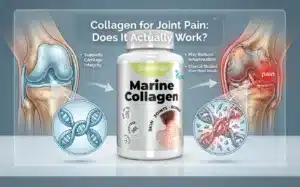
Collagen may help support joint comfort in some people, but the evidence is modest, results are slow, and it is not a substitute for medical... Continue reading
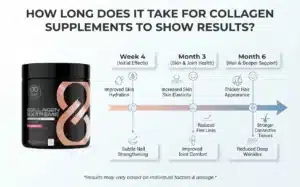
Most people notice their first change from collagen supplements after 4 to 8 weeks, with clearer skin and joint results building between 8 and 12... Continue reading
Add comment